
Technical Articles
NANBEI Is Professional On Providing One-step Solution Of Laboratory Instruments And Equipment
Introduction
The vacuum freezing–drying technology, which is also called sublimation drying, is a technical method that freezes the samples in advance, and then sublimates its moisture in the vacuum state. Goods are easier for long-term preservation after freezing-drying processing. They can be restored to the original state and maintain its chemical and biological characteristics after being watered. So the freezing-drying technology is widely used in medicine, food, chemistry industry and biological products etc.
This type freezing dryer is a new patented product. It has changed the traditional tedious operation and has realized the automation.
Freeze-drying operation
The control system uses industrial touch screen, easy to operate; each screen can display abundant process data; store 32 programs, each program may set up 36 segments; use intelligent Fuzzy Logic algorithm, the temperature control is accurate and stable; the control temperature parameters can be modified at any time in freeze drying process; when freeze drying control starts, system executes automatically product pre-freezing, vacuum pump starting, then execute the freeze drying process; system adopts a variety of stable measures to make sure system stable and reliable running. The control system contains following function screens:
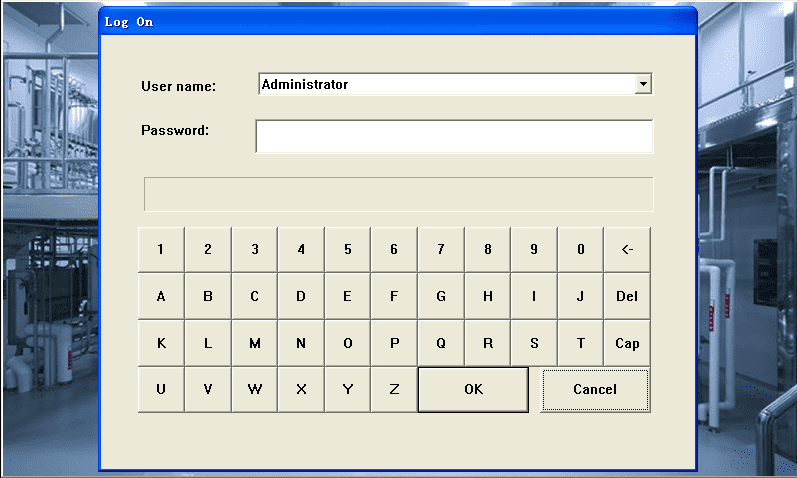
Fig1-1 Startup screen
1、Startup screen
Open the “Main power” switch, the control system displays the login interface; in figure1-1 shows the details; Input the password (default password: 111111), the control system will enter automatically into next screen "Main screen".
2、Main screen
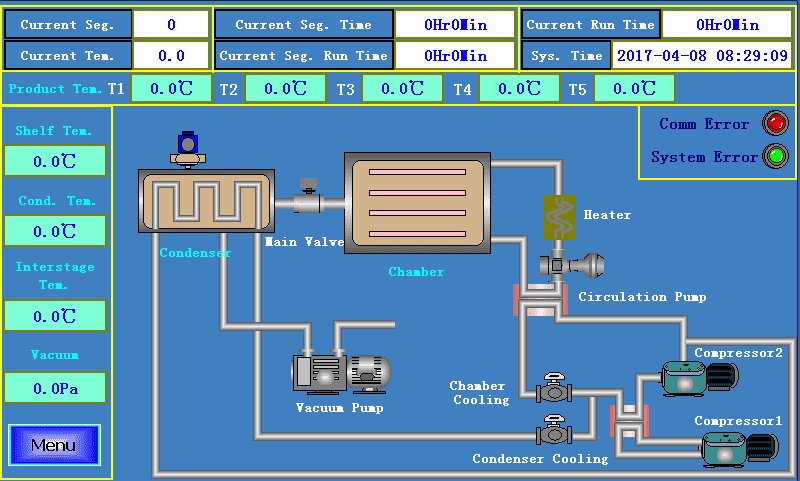
This screen displays the following contents:
"Current Seg." displays current freeze drying running segment;
"Current Tem." displays current set temperature;
"Current Seg. Time" displays current segment set time;
"Current Run time" displays total freeze drying time;
"Current Seg. Run Time" displays current segment running time;
"Sys. Time" displays the system time;
"T1-T5" displays product temperature1-5;
"Shelf Tem." displays current the temperature of shelf;
"Cond. Tem." displays the temperature of Condenser;
"Interstage Tem." displays the temperature that controls compressor2 startup;
"Vacuum" displays the current chamber vacuum value;
"Comm error" displays the communication status, green for normal;
"System Alarm" displays the system alarm status, green for normal;
When click the "Menu" button, and then select the "Freeze Dry Recipe", the system will switch into "Freeze Dry Recipe" screen.
3、" Freeze Dry Recipe " screen
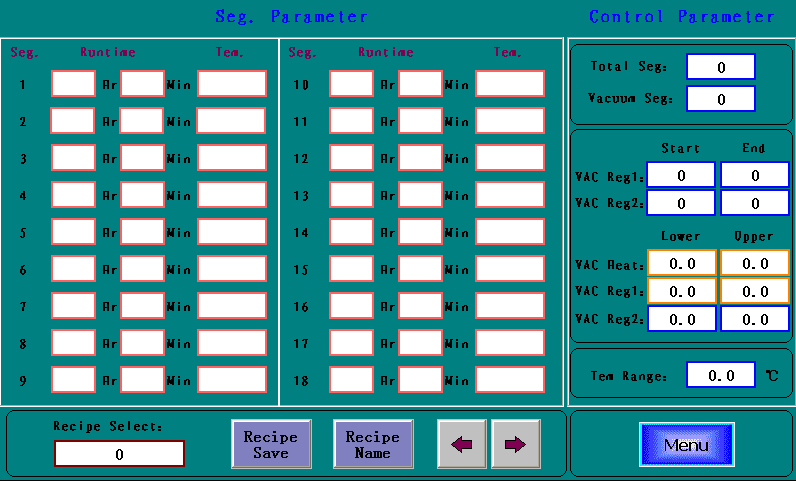
Fig1-3 Freeze Dry Recipe screen
As shown above, it has the following function icons:
"Total Seg." is the total freeze drying segment;
"Vacuum Seg." is segment number that prepare for vacuum pump startup;
"Recipe Select" is used for selecting the recipe number (0~32);
"Recipe Save" is used for saving the current freeze drying recipe;
"Recipe Name" is used for saving the current freeze drying recipe;

Vacuum Regulate is our standard function of our software, if no hardware is installed, you can set “0” for no working. Upper value must be bigger than lower value. If you input VAC Heat both “0”, it represents heating is not controlled by vacuum value. If you need vacuum heating, you need only to input the relevant value. When the current vacuum value is smaller than VAC Heat lower value, the system is in vacuum keeping status, and if after this the vacuum value is bigger than Upper value, the vacuum alarm energizes.
"Tem Range" is for automatic freeze drying. When the current segment time elapses, and the shelf tem is in Tem Range, then the system can progress to next segment, and vice versa. If "Tem Range" is 0, the above function is invalid.
Notice: the segment temperature is not allowed to set the value lower than the minimum temperature of the equipment can be achieved.
Click the "Menu" button, and then select the "Manual Operation", the system will switch into "Manual Operation" screen.
4、Manual Opertaion screen
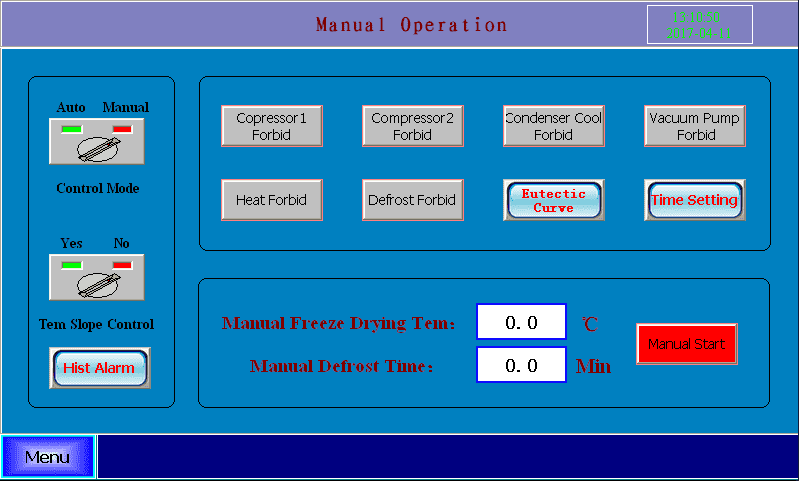
Before the operation, first you need to select the control mode to Manual position, click the “manual start” button, and then click the relevant button above. If the background of the button is grey, it represents the function button is invalid. If you need to switch to automatic freeze drying, you should click the “manual stop” button, switch the “control mode” to Auto position, and then click the “auto start” button. Notice: the running status of the compressor is not affected by freeze drying status!
The startup condition of the Compressor2 is: the Compressor1 is running, and the interstage temperature is below -30℃ (default). The startup condition of the vacuum pump is Condenser temperature below -40℃(default). Notice: Forbidden to start the compressor frequently, wait at least 3minuets to start the compressor after stop running.
In the manual freeze drying, you need only set the yellow frame parameters in the freezing drying recipe screen. Manual freeze drying tem and the defrost time can set in the above picture.
Click the "Menu" button, and then select the "Real-time Curve", the system will switch into "Real-time Curve" screen.
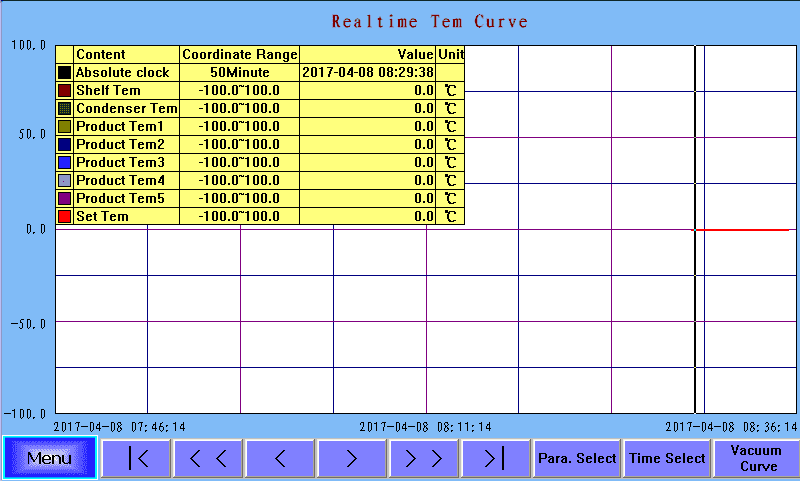
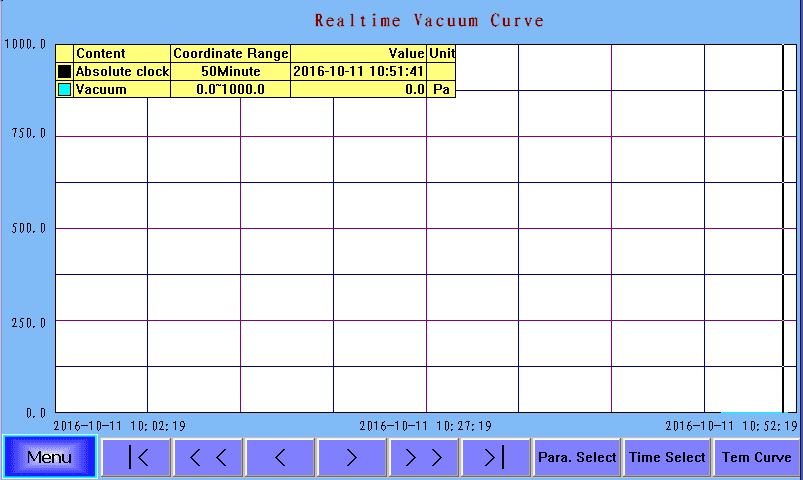
In the Real-time Curve screen, you can check the temperature curve of the freeze drying process, and click the “>” or “<” button to change the time length of the X-axis. You can also click the “Vacuum Curve” button to check the chamber vacuum curve. The vacuum curve Y-axis range is 0-1000.0Pa.
Click the "Menu" button, and then select the "History Curve", the system will switch into "History Curve" screen.
6、History Curve screen
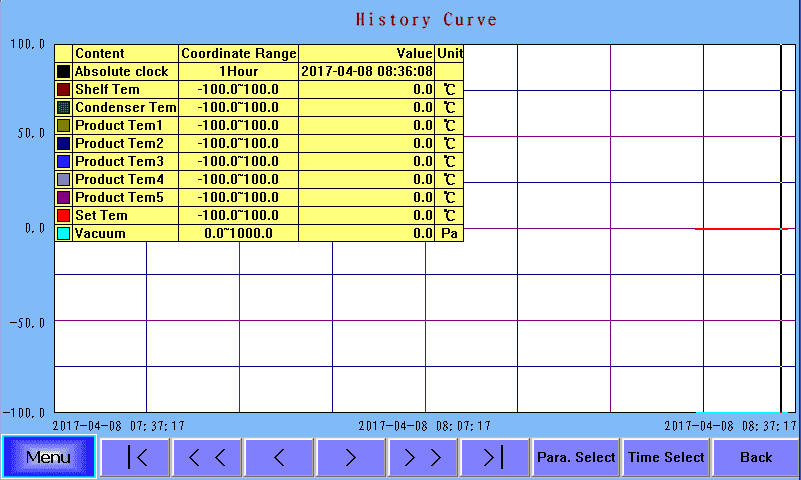
You can click the “Para. Select” to select the process parameters you want to display. This screen is mainly used for displaying freeze drying process tendency curve.
7、Data Record screen
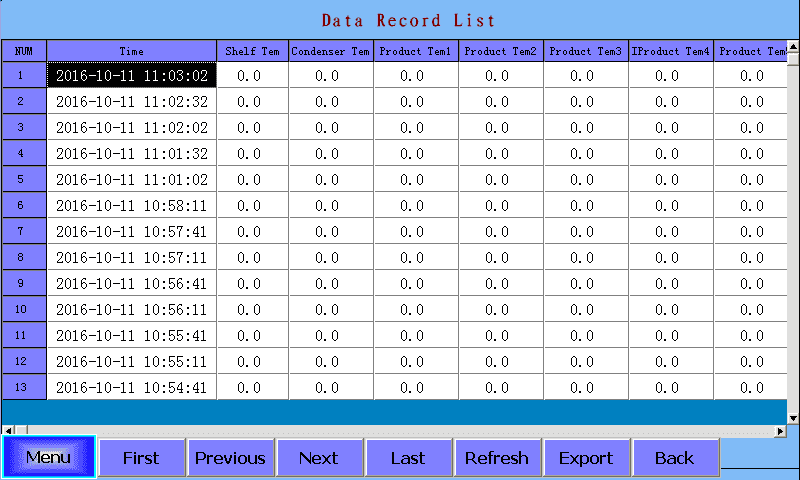
You can check the shelf tem, condenser tem, product tem1, product tem2, product tem3, product tem4, product tem5, interstage tem, vacuum value in this screen.
Through click the "page up" or "page down" button to check the data of different time.
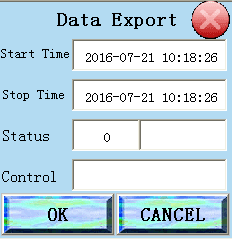
Click "export data" button, will pop-up "Data Export" dialog. Though click "OK" button and input time range, user may copy all data stored in industrial touch screen to the U disk (U disk capacity no bigger than 8G, USB2.0).
8、The freeze-drying process is over
8.1 After finishing the process, please open "Air Inlet" on the left of device. Click the "vacuum pump off" button in the screen, and then close the freeze drying process;
8.2 Collect materials that have been dried;
8.3 Click the "Defrost" button. The function will be closed after the setting time;
8.4 Clean the freeze dryer;
8.5 Turn off the power;
8.6 If the vacuum pump doesn't work for a long time, please cover the vent to prevent dust from entering.
Notices
1、The vacuum pump should be placed in the ground and keep a certain height difference with the freeze dryer.
2、The working temperature is less than or equal to 30℃. The humidity is less than or equal to 80%.
3、When shut downing, firstly air admitting, and then turn off the vacuum pump.
4、The ACRYLIC glass door and main engine connects by sealed ring.
5、The sealed ring should be kept clean.
6、 The vacuum pump oil should be replaced after it works continuously for 200 hours for the first time.
7、Don't frequently turn on the power switch and compressor.
8、After connecting the power line, please check the motor direction.
Common breakdown and elimination
1、The no-load vacuum value cannot reach 15Pa:
(1) Check the release valve is whether fastened down or not.
(2) The vacuum pump and main engine is connected by vacuum tube. Check the clamp is whether fastened down or not.
(3) Check the inner side of ACRYLIC door is whether smooth or not. Check the “O” rubber ring is whether damaged or not.
(4) Check the vacuum pump oil. Generally, oil should be changed after first working 200 hours.
2、The vacuum pump leaks oil:
Check the leaking parts; Replace the corresponding parts if necessary.
3、The temperature of Condenser is high:
The ambient temperature of freeze dryer is high.
The refrigeration system is break down, please connect our service department.
Nanbei Instrument manufactures and sells various models of freeze dryers. For technical inquiries or purchase inquiries, please click to contact us. We look forward to cooperating with you!